
Edits is a video editor on your phone; CutAgent is an automatic edit. Instagram's Edits app gives Reels creators a timeline, captions, effects, green screen and one-tap sharing to Instagram, and you build the edit yourself, clip by clip. CutAgent takes the raw takes of a talking-head video and gives you back the edited short: pauses and retakes removed, captions added and the shot framed for vertical. The real difference is time: in Edits you spend it tapping through cuts on a small screen; with CutAgent you spend it recording and reviewing.
Two different jobs
Both end in a vertical short for Reels, but the work in between is different.
- In Edits, you edit. You record or import clips, arrange them on a storyboard, trim them, add automatic captions and style them, then add audio, text and effects. Since January 2026 you can keep several takes of a clip on the storyboard to compare them, and you choose the one to keep.
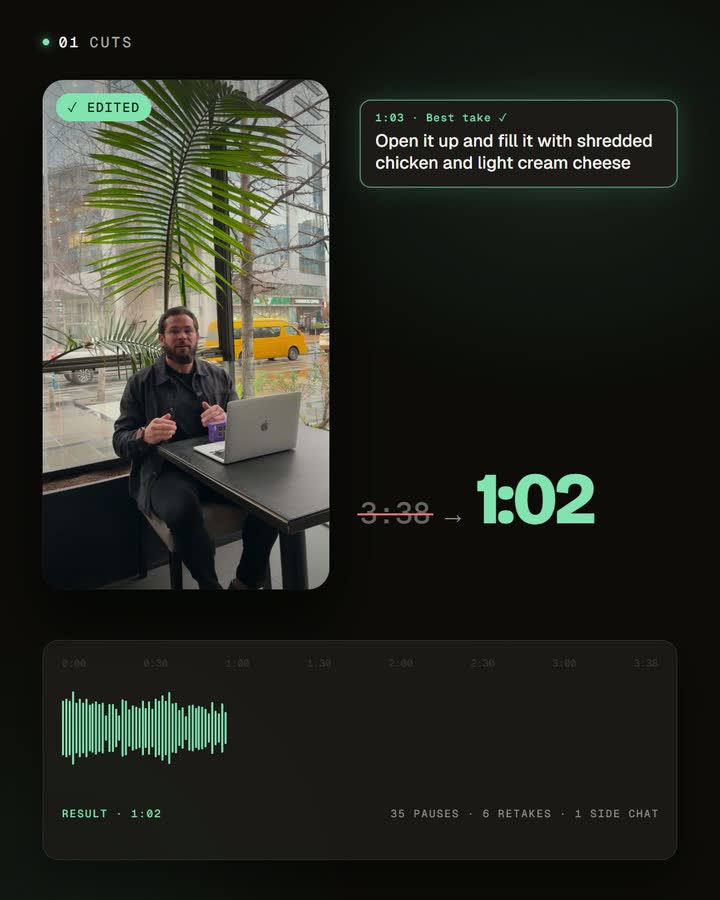
- In CutAgent, you hand over the recording. You upload your takes, choose captions, framing and animations, and the automatic edit decides the cuts from what you say, keeping your best take of each sentence. You review the result and adjust it only if you want to.
For talking-head videos most of the edit is the same every time: remove the dead air, keep the best take, caption, frame. That's the part CutAgent does for you.
Where the editing time goes
Editing a talking-head video on a phone is precise work on a small screen. A few minutes of footage can hold dozens of pauses and restarts, and each one means finding the spot, trimming it and checking that no word lost its start or end. Then come the takes to compare, the captions to check line by line and the framing. Edits makes each step quicker than it used to be, and it has added tools to speed up the cuts, but you still drive every one of them.
CutAgent does that whole pass for you, and you get a finished video to review. Your time goes into recording and the final check, which is what makes it realistic to record once and publish a week of shorts.
Side by side
| Instagram Edits | CutAgent | |
|---|---|---|
| Your time | You make each cut, pick each take and check the captions on your phone | Upload and review; cuts, takes, captions and framing come done |
| How you work | Mobile editor with a storyboard timeline, on iPhone and Android | Upload your takes; the edit is built for you |
| Retakes | Keep several takes of a clip and choose one yourself | Repeated lines are found in the transcript; your best take stays |
| Captions | Automatic captions with styles you choose | Word-by-word captions in the language you speak, in a style you can customize and save |
| Effects and audio | Effects, green screen, text, trending audio and stickers for Reels | Focused on what you say: zoom animations, an opening text hook and your own supporting images |
| Publishing | Shares straight to Instagram, with insights for your Reels | Download the finished video for Reels, Shorts and TikTok |
| Best for | Reels with effects, trends and hands-on creative edits | Talking-head shorts recorded in several takes |
When Edits is the better choice
- You want to edit by hand on your phone, with control over every cut and effect.
- Your Reels are more than someone talking: trends, transitions, green screen, music-driven edits.
- Instagram is your main channel and you like posting and checking insights from the same app.
When CutAgent is the better choice
- Your videos are you talking to the camera: tips, explanations, product demos, answers to questions.
- You record in several takes and don't want to compare them clip by clip.
- You publish often. Turning one recording session into a week of videos is where editing by hand stops keeping up.
- You don't want to spend your evenings on a phone timeline. The automatic edit is the default; the editor is there when you want to adjust something.
Using both
They fit together well. Let CutAgent do the talking-head edit (cuts, takes, captions, framing), download the video and open it in Edits when you want to add a trending sound, an effect or a sticker before you post to Instagram. You skip the repetitive part and keep the creative one. For a better raw recording to start from, see how to record a talking-head video on your phone.
Frequently asked questions
Does CutAgent replace Edits?
Not for everything. CutAgent replaces the talking-head edit; for effects, trends and hands-on creative edits, Edits is still the better tool.
Can Edits remove pauses automatically?
Edits has added a tool to cut silences, and you still choose takes and check the cuts yourself. CutAgent removes silences and repeated takes as part of a complete automatic edit, keeping your best take of each line.
Can I post a CutAgent video to Instagram?
Yes. Download the finished vertical video and post it as a Reel, or open it in Edits first to add a sound or an effect.
Is CutAgent only for Instagram?
No. The finished video works for Reels, YouTube Shorts and TikTok.
Try both with the same recording
Record one talking-head idea in a few takes. Edit it once on your phone in Edits and once with CutAgent's automatic edit, and compare how long each one took. That says more than any table.
Disclosure: we make CutAgent. We've described Edits from Instagram's own pages and help center, and current public sources, checked on October 24, 2026. Edits changes often, so check Instagram's site for the latest features.


