
CapCut is a manual video editor; CutAgent is an automatic one. CapCut gives you a timeline, a large library of effects and templates, and AI tools you apply one step at a time. CutAgent takes the raw takes of a talking-head video and returns a finished edit: pauses and retakes removed, captions added and the shot framed for vertical. The real difference is time: in CapCut you spend it making every cut yourself; with CutAgent you spend it recording and reviewing. If you enjoy building edits, CapCut is the better tool. If you'd rather talk to the camera and get your time back, CutAgent is.
Two different jobs
Both tools end with a short vertical video, but they start from different places.
- CapCut is where you build an edit: you place clips on a timeline, cut them, add music, transitions, text and effects, and use AI tools such as auto captions or background removal along the way. You decide every cut.
- CutAgent is where you hand over your footage: you upload your takes, choose a few options, and the automatic edit decides the cuts from your speech. You review the result and adjust it only if you want to.
That difference matters most for talking-head videos, where most of the editing is the same every time: remove the dead air, keep the best take, caption it, frame it.
Where the editing time goes
Editing a talking-head video by hand is mostly repetitive work. A few minutes of footage can hold dozens of pauses and restarts, and each one means finding it, cutting it and checking that no word lost its first or last sound. Then come the captions to check line by line and the crop to set for vertical. CapCut's AI tools speed up some of those steps, but you still run them, review them and assemble the result on the timeline.
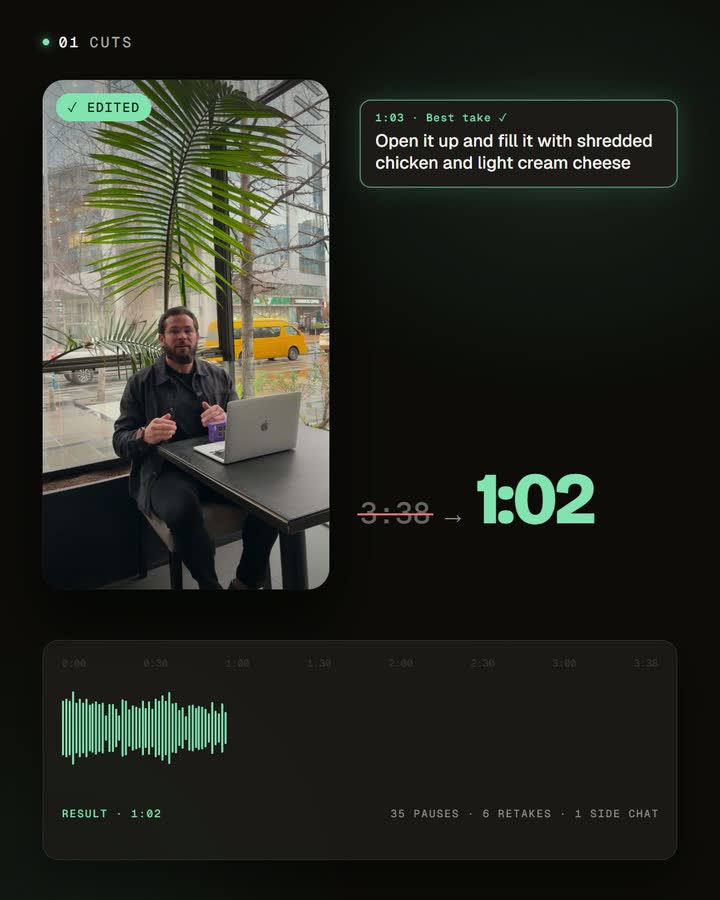
CutAgent does that whole pass for you: the silences and repeated takes come out, the captions and framing go in, and you get a finished video to review. Your time goes into recording and the final check, not into the timeline. That's what makes it possible to record once and publish a week of videos.
Side by side
| CapCut | CutAgent | |
|---|---|---|
| Your time | You make each cut, caption check and crop yourself | You upload and review; cuts, captions and framing are done for you |
| How you work | Manual timeline, with AI tools you apply step by step | Upload your takes; the edit is built for you |
| Pauses and filler words | Auto captions can flag filler words, which you then delete (CapCut's guide) | Silences and repeated takes are removed automatically; the best take of each line stays |
| Captions | Auto captions with styles and presets | Word-by-word captions in the language you speak, in a style you can customize and save |
| Vertical framing | Reframe tools to change aspect ratio | Face detection places a 9:16 crop around the speaker |
| Effects, music and templates | A very large library of templates, transitions, effects and music | Focused on your speech: zoom animations, an opening text hook and your own supporting images |
| Manual control | Full, frame by frame | An editor to review the automatic edit, restore cuts and adjust captions |
| Best for | Montages, trends, vlogs, edits with music and effects | Talking-head shorts recorded in several takes |
When CapCut is the better choice
- You want full creative control. Transitions, keyframes, speed ramps, overlays: CapCut is built for crafting an edit by hand.
- Your video is more than someone talking. Montages, travel clips and trend formats rely on music, effects and templates.
- You enjoy editing, or you're learning it.
When CutAgent is the better choice
- Your videos are you talking to the camera: tips, explanations, product demos, answers to questions.
- You record in several takes. CutAgent finds the repeated lines in the transcript and keeps the best one, so you can restart freely.
- You publish often. Turning a recording session into a week of videos is where editing by hand stops scaling.
- You don't want to learn a timeline. The automatic edit is the default; the editor is there when you want to adjust something.
Using both
They don't exclude each other. A practical split: let CutAgent do the talking-head edit (cuts, captions, framing), download the video and open it in CapCut when you want to add a trend sound, a transition or an effect from its library. You skip the repetitive, time-consuming part and keep the creative one.
Frequently asked questions
Is CutAgent a CapCut replacement?
Not for everything. CutAgent replaces the editing of talking-head videos; for montages, effects and templates, CapCut is still the better tool.
Can CapCut remove pauses automatically?
CapCut's desktop editor can flag filler words in auto captions, and its tools include pause removal; you review and delete the cuts in the timeline. CutAgent removes silences and repeated takes as part of a complete automatic edit.
Does CutAgent have templates and effects like CapCut?
No. CutAgent focuses on editing your speech: cuts, captions, framing, zoom animations, an opening text hook and your own images. It isn't a template or effects library.
Can I edit a CutAgent video further in CapCut?
Yes. Download the finished video and import it into CapCut like any other clip.
Try both on the same recording
Record one talking-head idea in a few takes. Edit it once by hand in CapCut and once with CutAgent's automatic edit, then compare the time each took and the result. That tells you more than any table.
Disclosure: we make CutAgent. We've described CapCut from its own documentation and current public sources, checked on October 23, 2026. CapCut changes often, so check its site for the latest features and prices.


